How to Run AI Models Locally—and Why It May Be Worth Doing

Open-weight AI models now trail the strongest closed models by an average of only about four months, and an increasing number can run on computers people may already own.
The term “open-weight” refers to models whose developers publish their weights—the files that contain what the models learned during training—so anyone can download and run them. Two free applications, Ollama and LM Studio, take care of the rest. Downloads of Gemma 4 available in Ollama’s library range in size from approximately 4.6GB to 20GB.
Using open models means you do not have to spend $20 a month on an AI subscription or send your conversations to someone else’s servers to use a capable chatbot. This guide covers how to download and run AI models on your own computer, the hardware requirements, and the steps for getting started with free tools such as Ollama and LM Studio.
Whether your aim is to cut costs, keep conversations private, or experiment with AI models that you can customize, creating a local AI assistant may be more straightforward than it seems.
Why run an AI model on your own machine
A cloud-based chatbot sends each prompt to a company’s servers. As Decrypt noted in a review of privacy-focused AI tools, a court ordered OpenAI to preserve ChatGPT logs, including messages that had been deleted. With a local model, the conversation stays on your computer, where no one can access it without your permission.
According to LM Studio’s documentation, the application “can operate entirely offline, just make sure to get some model files first.” Documents attached to a chat can also be handled completely offline.
Paid chatbot subscriptions typically cost around $20 per month, whereas the software discussed here is free. The expense instead comes down to hardware, which you may already own.
The license attached to a set of downloaded weights determines how you are allowed to use them. DeepSeek’s R1 series is released under the MIT License. Its model card says the models “support commercial use, allow for any modifications and derivative works.” Google’s Gemma 4 and OpenAI’s gpt-oss, meanwhile, are distributed under Apache 2.0.
Using models released under open-source licenses such as Apache or MIT gives users the freedom to use and modify them, as well as to work with them in other ways permitted by those licenses. It also makes improved or modified versions of a model available to people whose needs differ from those of the original model. For example, someone looking for a model suited to medical work may not need strong coding capabilities. That kind of tailoring is possible with customized models.
What your hardware can actually run
Models are measured by their number of parameters—the internal values adjusted during training—and larger models generally require larger downloads. To run a model, its files must fit into a computer’s graphics memory, known as video RAM (VRAM), or, on a Mac, into unified memory shared by the processor and graphics chip.
As a general guideline, at least 8GB of VRAM is desirable; smaller, compressed models can fit within that capacity. More demanding users, however, should consider a gaming GPU with 24GB of VRAM or more. That capacity can be assembled by using multiple GPUs or obtained through dedicated AI racks or machines with unified memory, such as the Mac Mini or Nvidia DGX Spark.
Quantization reduces a model’s size by representing each weight with fewer bits. Hugging Face’s documentation describes the process as representing weights and activations “with low-precision data types like 8-bit integer (int8) instead of the usual 32-bit floating point (float32).” This lowers memory requirements, but comes at the cost of some accuracy.
LM Studio’s system requirements call for at least 16GB of RAM on Apple Silicon Macs running macOS 14 or later, although Macs with 8GB can run smaller models. For Windows computers, the recommendation is at least 16GB of RAM and 4GB of dedicated VRAM, along with a processor that supports AVX2. Intel-based Macs are not supported.
Ollama’s model library lists Gemma 4 26B at between 16GB and 19GB, while the 31B version requires 19GB to 20GB. OpenAI says its gpt-oss-20b needs just 16GB of memory, while gpt-oss-120b can run within 80GB.
How to set up Ollama and LM Studio
LM Studio is likely to be the more accessible option for many people because it offers a polished graphical user interface. Ollama, by contrast, is geared toward developers and more experienced users who are comfortable working in a command-line interface (CLI).
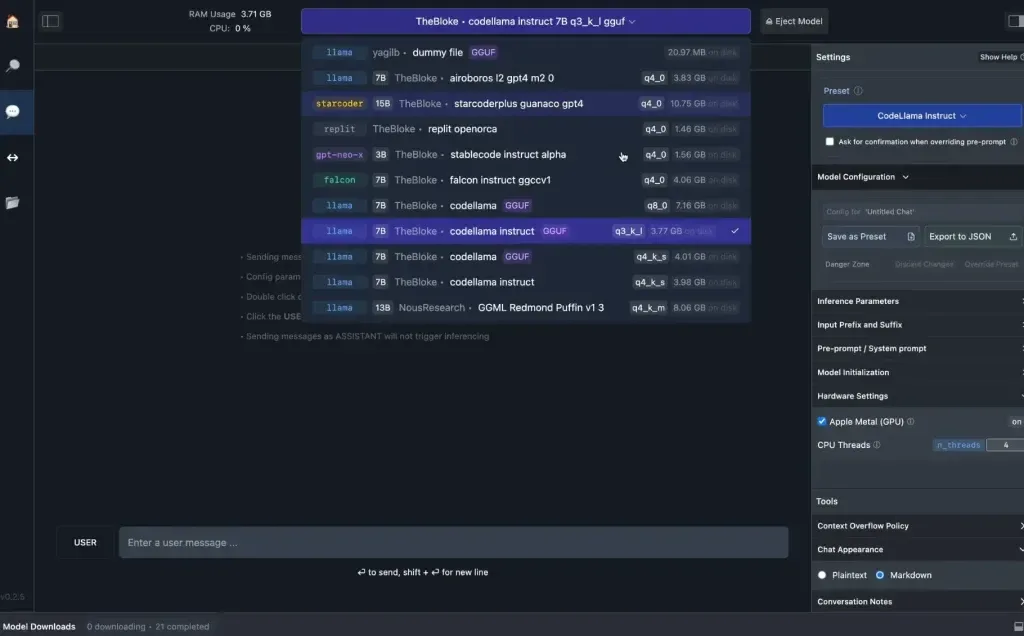
To get started with LM Studio, download the installer for your operating system from lmstudio.ai. Then search for a model within the application, download its weights, and open a chat. The app searches Hugging Face, the public hub where open models are published.
On macOS and Linux, Ollama can be installed with the command curl -fsSL https://ollama.com/install.sh | sh. Windows users can install it by running irm https://ollama.com/install.ps1 | iex in PowerShell. Both commands are listed on Ollama’s download page.
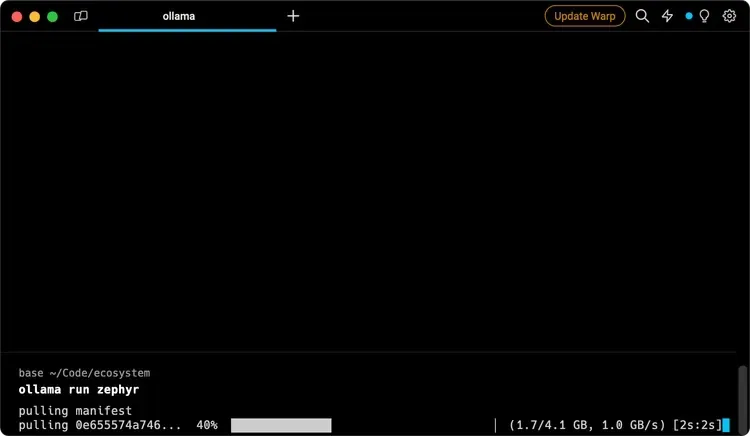
Entering ollama pull gemma4:e2b downloads a model, while ollama run gemma4:e2b starts a chat. The /bye command exits the conversation, according to Ollama’s quickstart guide. Ollama also makes a local API available at http://localhost:11434, allowing other applications on the same computer to use the model.
Models with names ending in “:cloud,” such as gemma4:cloud, are different: they run in Ollama’s cloud and do not need to be downloaded. If privacy is the reason for running a local model, avoid those cloud versions. However, they offer another option for people who need more powerful models: API calls and prompts handled through the service are not stored on providers’ servers and are not used to train models.
Google’s Multi-Token Prediction drafters for Gemma 4, available through Ollama under Apache 2.0, can accelerate generation by as much as three times. They use speculative decoding: a smaller model proposes several upcoming tokens, and the larger model checks those proposed tokens together.
Google explained that “if the target model agrees with the draft, it accepts the entire sequence in a single forward pass.” During that same pass, the target model also contributes one additional token of its own.
Local models can gain web-search and file-access capabilities through MCP servers. MCP stands for Model Context Protocol, and LM Studio added support for it in version 0.3.17, according to Decrypt’s guide.
Where local models still lose to the cloud
The four-month average gap applies to the most capable open models; the largest models remain far beyond what consumer hardware can handle. Alibaba’s Qwen3.8-Max has 2.4 trillion parameters in total, with 95 billion active at any given time. By comparison, OpenAI says gpt-oss-120b can run within 80GB of memory.
When a model does not fit in VRAM and spills over into system RAM, its responses can become much slower. Larger context windows also require more memory. A context window is the amount of text a model can consider at one time. The smaller Gemma 4 models offer a 128K-token context window, while the larger versions provide 256K.
Cloud services remove the need to plan around these hardware limits, and the frontier models powering them still perform better on the most difficult tests.
For people who want to use AI privately, Decrypt’s own review recommended “xPrivo with a self-hosted local model for day-to-day drafting that must not leave your machine,” and Kagi “when you need web retrieval and accept the API call tradeoff.”